How sequences run
Email and LinkedIn steps run as parallel tracks on a day-based cadence. What the default sequence looks like, when each step actually goes out, and how to change the spacing.
Every lead in a campaign gets their own sequence: a drafted plan of emails and LinkedIn touches, written for that person, that Strama works through over a few weeks. This article covers the machinery underneath, including what the default plan looks like, how the two channels run side by side, when a step actually goes out, and how to change the spacing. For the bigger picture of how sequences fit into a campaign, start with How Strama works.
The default sequence
When you create a campaign, the sequence shape starts as five emails and two LinkedIn messages spread over 21 days. Because a LinkedIn message can only be delivered to a connection, Strama also adds a connection invite automatically. You never add the invite yourself; it appears with the first LinkedIn touch and always leads the LinkedIn track.
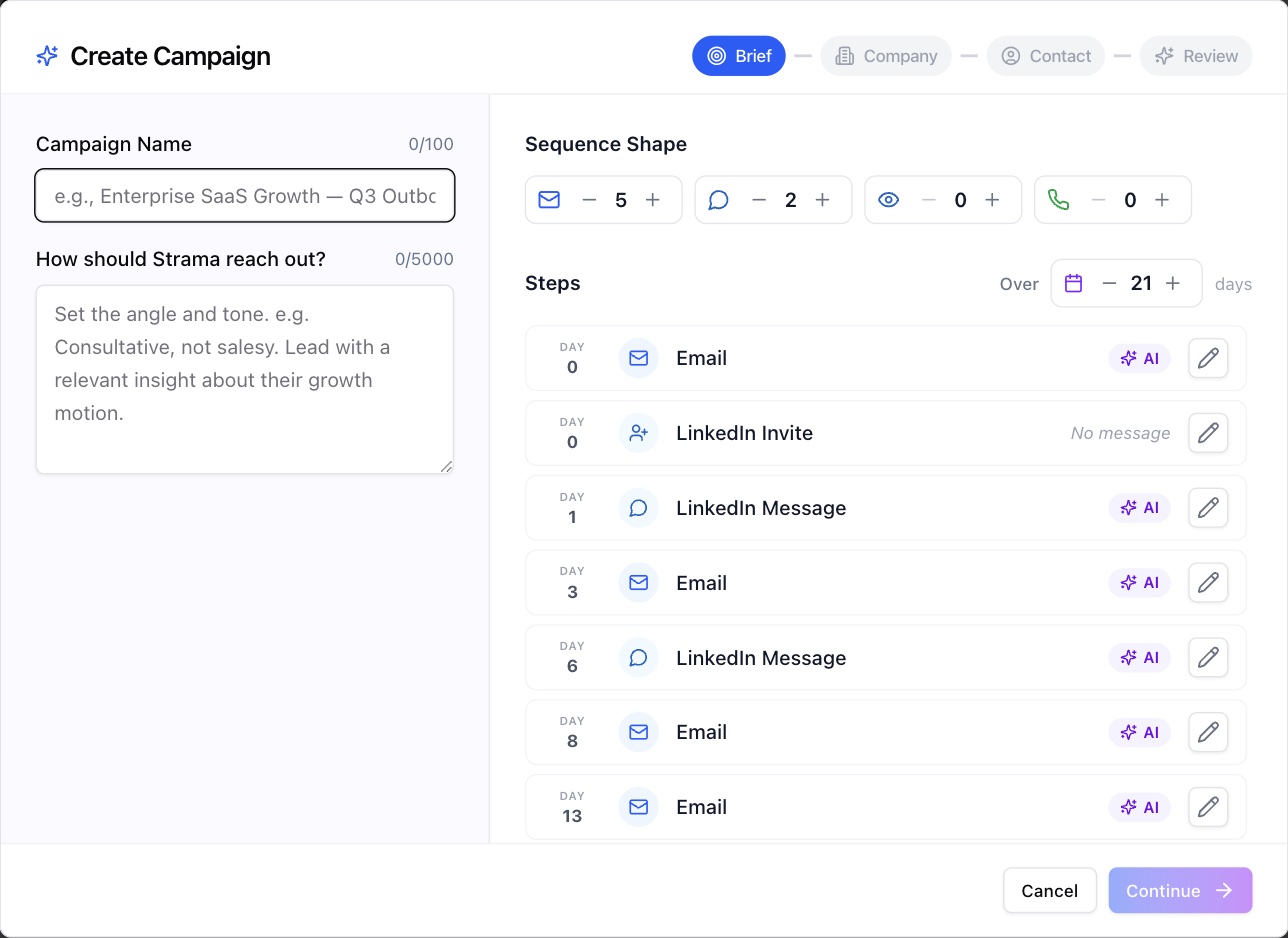
The shape is yours to change before the campaign is created:
- Four channels have steppers: emails, LinkedIn messages, LinkedIn profile visits, and phone calls. Each channel can hold up to 12 steps.
- The Over N days control stretches or compresses the whole plan, up to 12 weeks. Strama re-spaces every step across the window for you, with slightly irregular gaps so the cadence does not look machine-perfect.
With the default shape, the first email goes out on day 0, the connection invite also goes out on day 0, the first LinkedIn message follows on day 1 (right behind the invite, so a quick accept gets a quick follow-up), and the remaining steps land roughly every four days until the window is used up.
Email and LinkedIn run in parallel
A sequence is not one single queue. Each channel is its own independent track: the email steps chain to each other, the LinkedIn steps chain to each other, and neither track ever waits on the other.
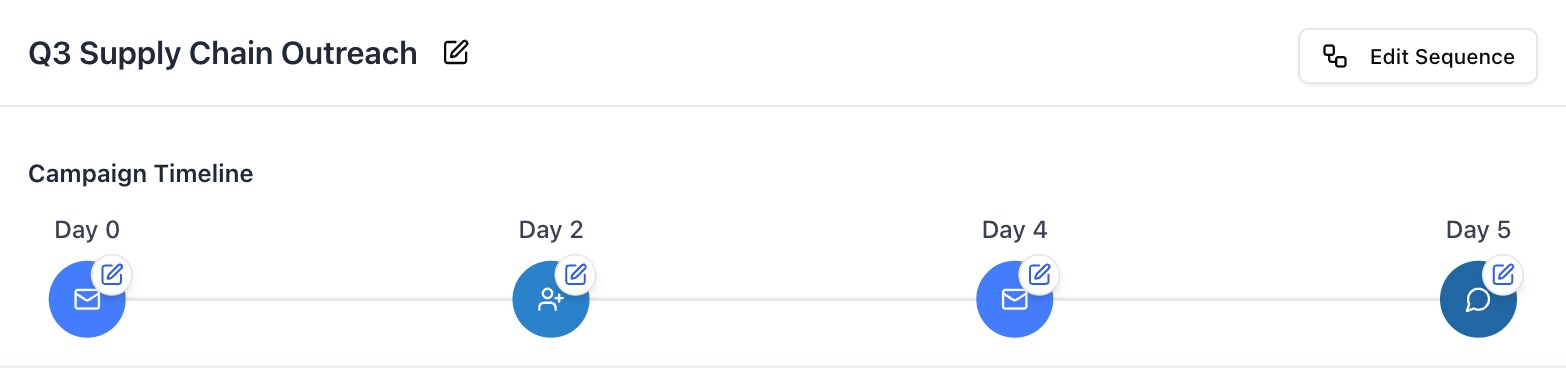
The question this answers most often: a pending connection invite never blocks or delays your emails. LinkedIn messages are held until the prospect accepts the invite, but the email track keeps moving on its own schedule the entire time. Profile visits and call steps are separate tracks too.
Note: The two channels also never reference each other in their copy. Each message is written as if the prospect saw only that channel, so a LinkedIn message will not say "as I mentioned in my email." Many prospects read one channel and ignore the other, and a reference to a message they never saw reads as spam.
If the invite is never accepted
Nothing stalls. The emails keep sending on schedule, and the LinkedIn messages simply stay held. Once every step outside the LinkedIn track has gone out and the invite has been pending for 30 days, the sequence completes on its own with a no-response outcome, so it never sits open forever waiting on a connection. If the prospect accepts at any point before then, the held LinkedIn message goes out in the next sending window and the LinkedIn track picks back up. For how invites and acceptances work on the LinkedIn side, see Connecting your LinkedIn account.
What a step's day actually means
Step timing is measured in days, not timestamps, and the days are relative:
- The first step of each channel counts from the moment you start the sequence.
- Every later step counts from the day the previous step in its channel actually went out, not from the original calendar plan.
Within a day, the exact send time depends on the sender. Steps go out during the sender's sending hours, 9am to 5pm in the timezone set on the sender, only on the weekdays that sender has enabled. Sends are spaced with randomized human-like gaps (a few minutes between emails, similar pacing with periodic breaks on LinkedIn), and each channel's daily sending limits still apply.
Note: A step's day is the earliest it can go out, not a guarantee. If a daily limit is reached or the sending window closes first, the step rolls to the next sending day, and later steps in that channel shift with it. Delays can stretch a sequence; they never compress it.
Changing the cadence
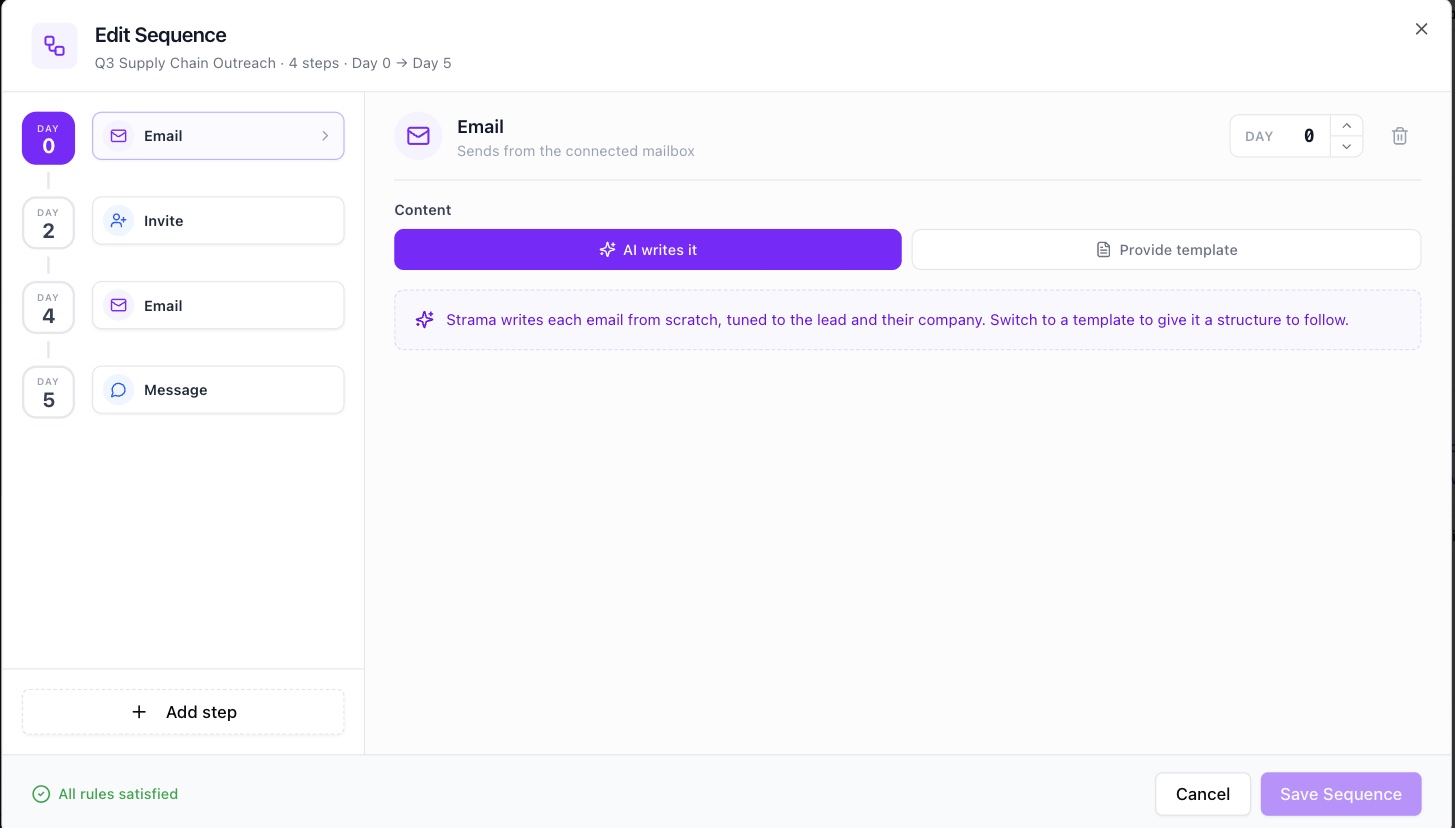
For the whole campaign: open the campaign, choose Edit Campaign, then Edit Sequence. Every step carries its own day; change the day with the stepper, add or delete steps, and the footer validates the plan as you edit. Saving changes the plan for leads whose sequences are generated after that point. Leads that already have a drafted sequence keep their steps, which you edit per lead.
For a single lead: open the lead's sequence and use the menu on any step that has not gone out yet. Change send delay moves that step to a different day, and Add Step inserts a new Email, Call, LinkedIn Message, or LinkedIn Profile Visit step at the day you choose. The full set of per-lead changes, including AI revisions and full regeneration, is covered in Edit, revise, regenerate.
A few rules hold everywhere:
- Two steps of the same type cannot land on the same day.
- The connection invite is always the first LinkedIn step; message steps must come after it.
- Steps that have already gone out are frozen. Editing days only ever moves the steps that have not sent yet.
To drop LinkedIn from a campaign entirely, set its LinkedIn messages to zero in the sequence shape; the automatic invite is removed with the last LinkedIn touch. On a single lead's sequence, delete the LinkedIn message steps first and then the invite.
Nothing sends until you start
Adding a lead to a campaign never messages them. It creates an idle sequence, and even generating the content does not send anything: the entire sequence is written in one pass, so every email and LinkedIn message in the plan exists as a draft you can read before anything goes out.

The sequence waits at Ready to start until you press Start sequence (or start a batch of leads at once with Run sequences). After that, its day 0 steps go out in the sender's next sending window, and the cadence unfolds from there.
FAQ
Do LinkedIn steps block or divert my email steps?
No. Email and LinkedIn are independent tracks. A connection invite that has not been accepted holds only the LinkedIn messages behind it; every email sends on its own schedule regardless of what is happening on LinkedIn.
What happens if the prospect never accepts my LinkedIn connection request?
The emails all still send. The LinkedIn messages stay held, and once everything else has gone out and the invite has been pending for 30 days, the sequence completes automatically as no-response. An acceptance at any point before that releases the held messages.
What is the default sequence, and how long does it run?
Five emails and two LinkedIn messages, plus the automatic connection invite, over 21 days. You can reshape it when creating the campaign (each channel up to 12 steps, the window up to 12 weeks) and edit the steps and days afterward.
Do email and LinkedIn messages reference each other?
No, deliberately. Each message assumes the prospect saw only its own channel, so nothing points at a message they may never have received.
Does adding a lead to a campaign send them anything immediately?
No. Adding a lead creates an idle sequence, and generation only produces drafts. Nothing goes out until you start the sequence, and even then the first steps wait for the sender's next sending window.
Can I control which channel goes out first?
There is no channel-order setting; order comes from the days you give the steps. By default the first email and the connection invite both go out on day 0. You can move any unsent step to a different day, with one fixed rule: the invite always comes before the LinkedIn messages.