How scorecards work
A scorecard is the brief your AI SDR researches and grades every lead against, from A to F. Here is how to build one, how to phrase criteria the AI can actually verify, what the grading description does, and why a lead that meets most of your criteria can still come back with a low grade.
Every campaign in Strama carries a scorecard, and it does two jobs at once. It qualifies: each lead is researched and graded from A to F against your criteria, so your sending capacity goes to people who actually fit. And it researches: the report Strama gathers to answer your criteria is the same research that makes the emails specific. As the campaign wizard puts it, each criterion does two things: it scores how well a lead fits, and it gives the AI something concrete to say.
This article covers what a scorecard is (and is not), how to build one, how to phrase criteria, and the part that generates the most support questions: how the letter grade is actually decided.
Scorecards and personas do different jobs
The two get mixed up on almost every onboarding call, so here is the split:
- A persona is a set of search filters. It lives in Lead Scout and finds people who look right on paper: titles, seniority, location, company size.
- A scorecard takes over after someone is in a campaign. Strama researches the person or company, checks each of your criteria against what it found, and assigns a grade. The persona asks "who should I look at?"; the scorecard asks "now that I can see them properly, are they worth writing to, and what should I say?"
A persona can only use what a search index knows. A scorecard can ask questions that take real research to answer: whether the company is hiring for the problem you solve, whether this person owns the budget, whether they have talked about the pain publicly.
One campaign, two scorecards
Open Edit Campaign on any campaign and you will find a Scorecards section with two slots: a Contact Scorecard ("for individual contacts") and a Company Scorecard ("for company information").
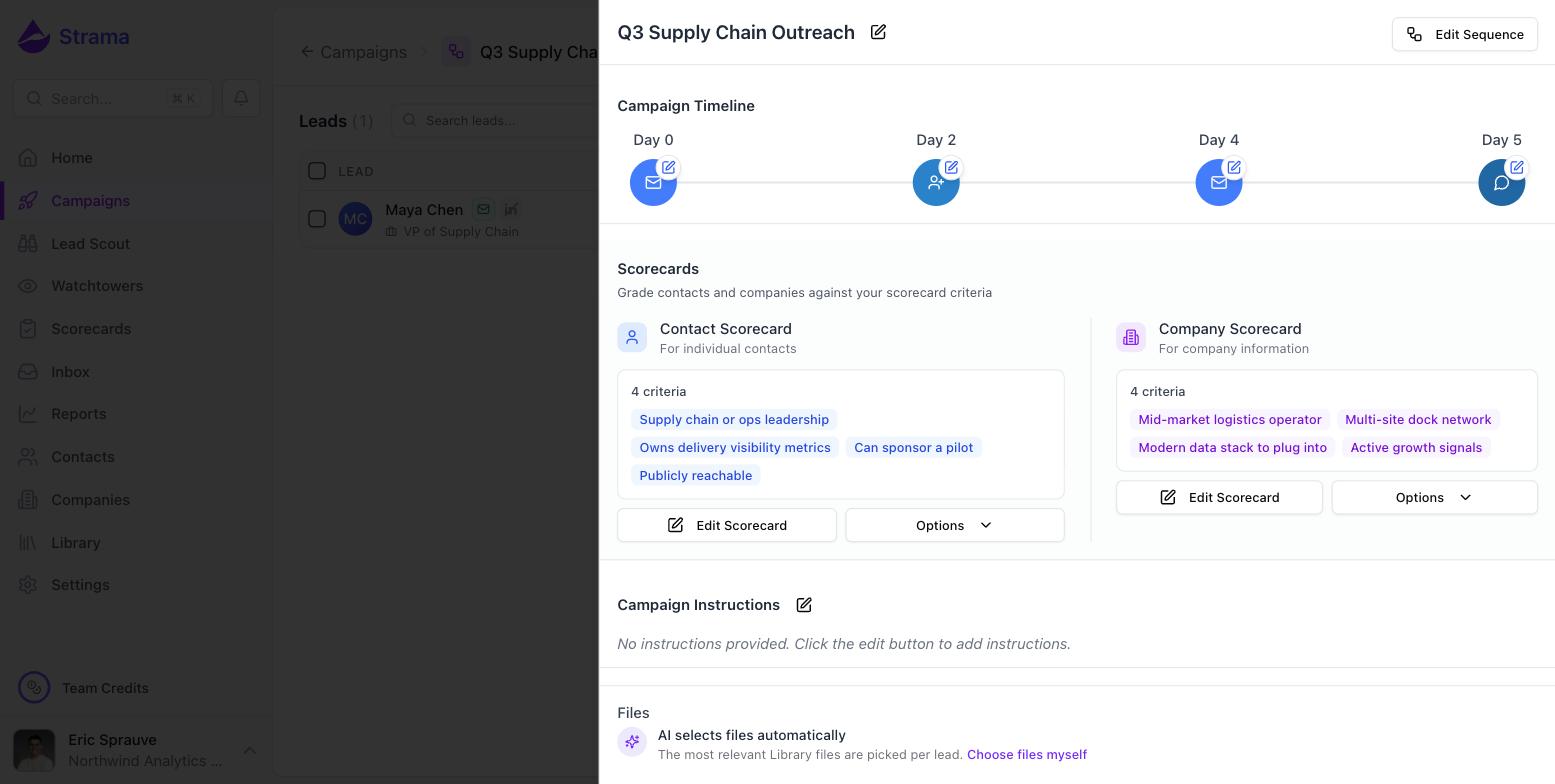
A few rules worth knowing:
- Each campaign holds at most one scorecard per slot. The contact side is required before sequences can generate; the company side is optional.
- Scorecards created inside a campaign (by the wizard or the campaign editor) are private to that campaign. They do not appear in your Scorecards list until you share them via Options, then Make Shared.
- A shared scorecard can be linked to many campaigns, and leads at the same company share one company grade, so the research is not repeated.
Building a scorecard
The standalone path is the Scorecards page in the sidebar: click New Scorecard, name it, pick Company or Contact, and you land in the criteria builder.
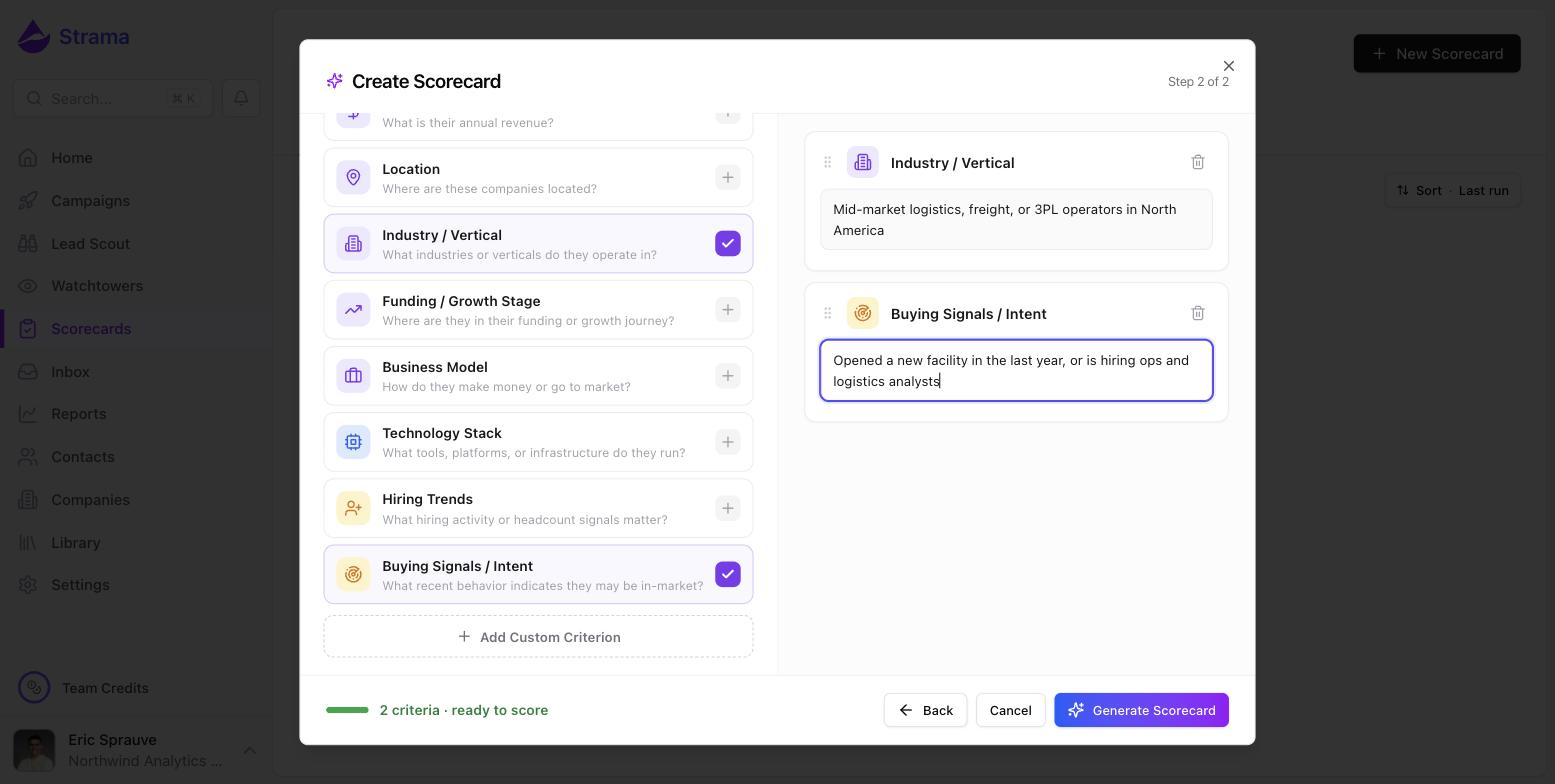
The left column is a library of common angles (Employee Count, Industry / Vertical, Technology Stack, Buying Signals / Intent, and so on). Add the ones that matter, describe each in a sentence of plain English, or click Add Custom Criterion for anything the library does not cover. Generate Scorecard then has the AI expand your notes into a full scorecard: named criteria with detailed descriptions, plus a grading description. Generation also reads the files you have marked as Knowledge in your Library, so it knows what your product actually does.
The campaign wizard builds scorecards the same way: its Company and Contact steps are this exact builder, and the criteria you write there become the campaign's two scorecards. In the wizard you can also pull in an existing scorecard instead of writing one.
Tip: The wizard's own guidance is right: a good brief has 3 to 5 points. The hard cap is 20 criteria per scorecard, but more criteria means more ways to fail, and every criterion should earn its place.
Writing criteria the AI can grade
A criterion is two fields: a short name and a description of what passing looks like.
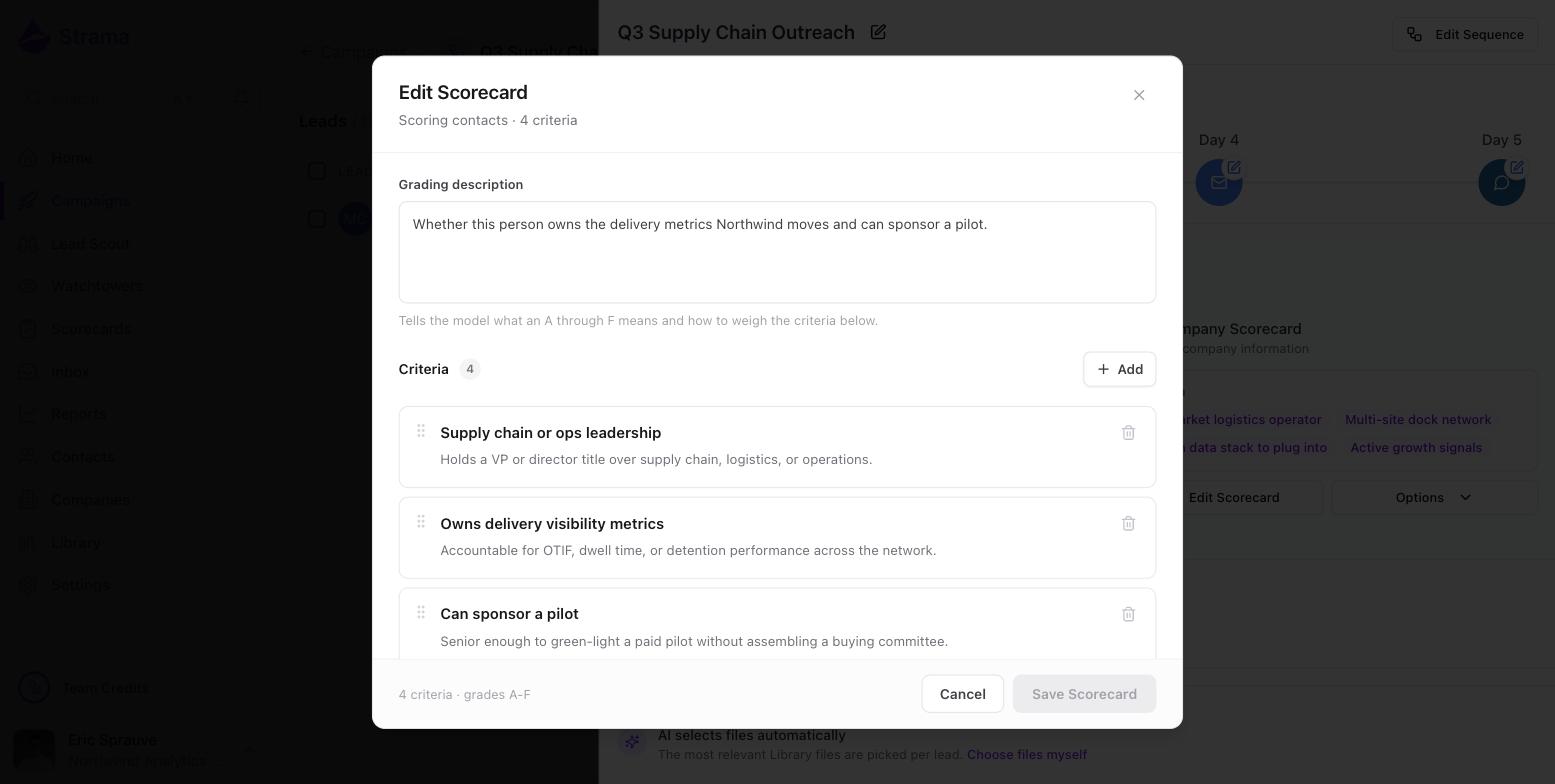
There is no required format and no rubric structure to follow. Write the description the way you would brief a junior researcher: state exactly what to look for and what counts as a match. "Owns delivery visibility metrics: accountable for OTIF, dwell time, or detention performance across the network" grades well. "Good fit for us" does not.
Two rules matter more than any phrasing advice:
Make it observable from public information. The researcher works from what it can find: the company website, LinkedIn, news, public filings. If a criterion cannot be verified from the outside, it does not pass on the benefit of the doubt.
Warning: When the research cannot confirm a criterion, it counts as a fail, not a pass. This is the single most common reason a good lead grades lower than expected. "Has budget authority" often cannot be verified for a private individual; "holds a VP or Director title over the relevant function" usually can.
Phrase disqualifiers so that passing means safe. There is no separate disqualifier toggle. To screen something out, write a criterion that passes when the lead is clean, for example "Not an agency: the company sells its own product, not consulting or agency services." Then use the grading description to say what a failure there means (see the next section).
The grading description sets the weights
Above the criteria sits a free-text box labeled Grading description. The editor's own helper text explains it: "Tells the model what an A through F means and how to weigh the criteria below."
Behind the scenes, Strama turns your description and criteria into a grading rubric that is applied consistently on every run, so the same pass/fail results always map to the same grade. The grading description is where importance lives. If some criteria are must-haves and others are bonuses, say so in words:
- "An A requires the leadership and metrics criteria. Public reachability is nice to have and should only separate an A from a B."
- "Any lead that fails the agency check is an F regardless of the rest."
If you leave the description empty, Strama infers a reasonable weighting from the criteria alone, which usually means each criterion counts roughly equally.
What happens when a lead is scored
Grading runs when you click Score (in the Fit column, the bulk action bar, or the lead's Intelligence tab), and it also runs automatically as the first stage when you generate or start sequences. Adding a lead to a campaign does not grade it by itself.
Each run moves through three stages you can watch on the lead: Researching, Grading, Verdicting. Strama first builds a research report shaped by your criteria (every criterion becomes research questions), then checks each criterion against that report with a pass or fail and a written justification, then applies the rubric to assign the grade. The grades read: A Excellent, B Good, C Fair, D Poor, F No Fit.
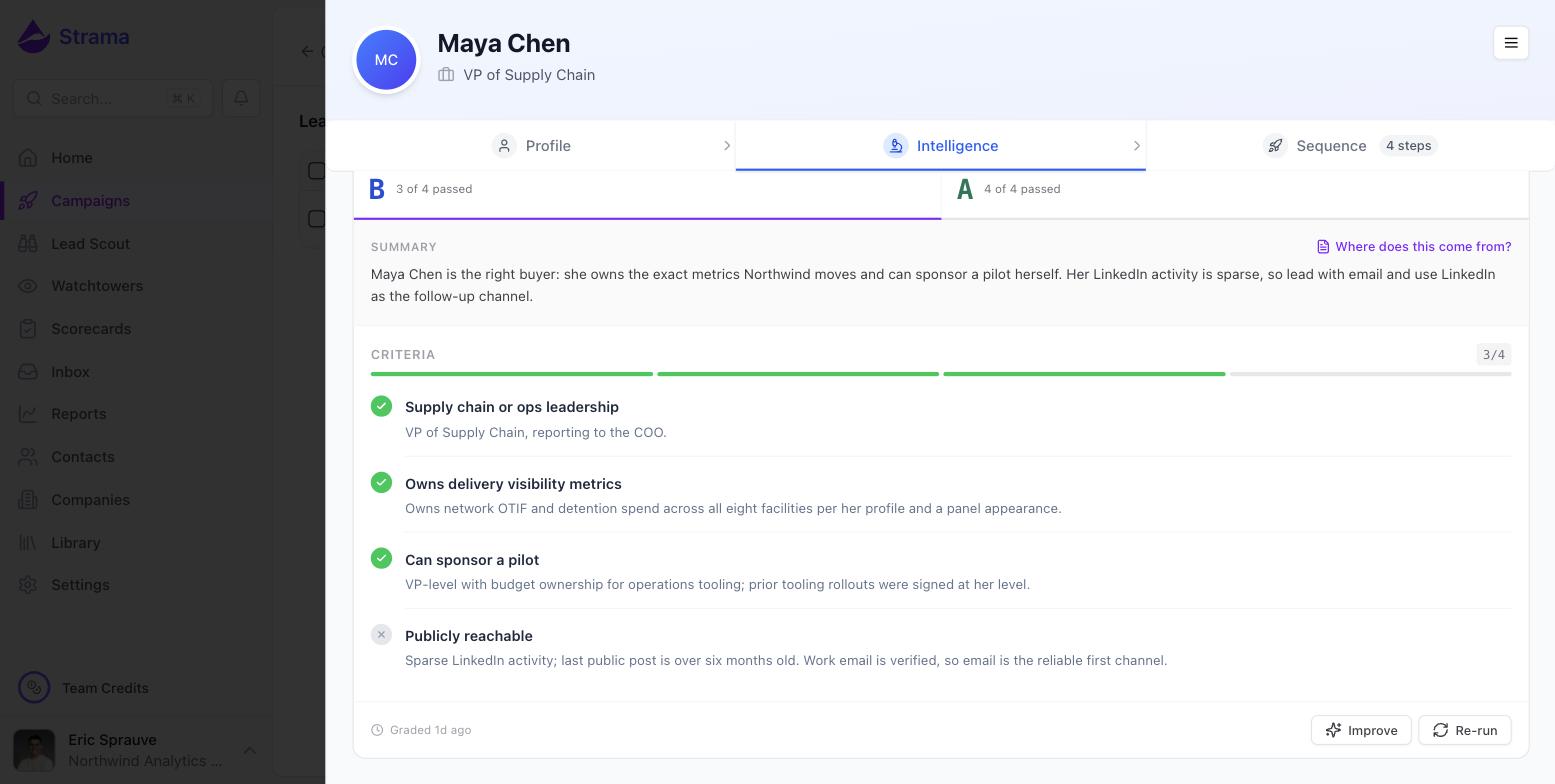
The Intelligence tab shows the full result: the grade, a summary, and the criterion-by-criterion breakdown. The research behind it is one click away via Where does this come from?, covered in Where research comes from. That same report is what sequence generation writes from, which is why a lead must be scored before its sequence can generate.
A few practical notes:
- A scorecard run costs 2 credits. A campaign with both scorecards spends 4 credits per lead, except that leads at the same company share the company grade. See What costs credits.
- A company needs a website or a LinkedIn URL before it can be graded. A contact with a private or sparse LinkedIn profile can still be graded, but the result is flagged "Graded from limited data".
- Grades appear in the campaign's Fit column, on the lead's Intelligence tab, on the contact page, and on the scorecard's own page, where you can see the grade distribution across everyone scored.
Why a lead that meets most criteria can still grade low
This is the question support hears most, from teams who see 3 of 4 criteria pass and expect an A. Three things explain almost every case:
- A failed must-have caps the grade. If your grading description (or the inferred rubric) treats a criterion as critical, failing it alone can pull the grade to a D or F no matter how many others pass. That is by design: it is what makes disqualifiers work.
- An unverifiable criterion failed silently. Remember the default: cannot confirm means fail. Check the justification text on the failed criterion. If it says something like "no public information found", the criterion needs rephrasing toward observable evidence, not the lead a lower opinion.
- The research was thin. A "Graded from limited data" warning means the researcher could not see much. The grade is honest about what was visible, not a verdict on the person.
When a grade looks wrong, click Improve on the grade banner and describe what looks off in plain English. Strama proposes concrete edits to the scorecard (its description or criteria) and shows them to you before anything is saved. You can also hover any criterion row and click "Disagree? Improve this criterion" to target just that one.
Note: Editing a scorecard never changes existing grades on its own. Grades stay as they were until you re-run scoring, and re-running uses credits. After a meaningful edit, re-score a handful of leads to check the new behavior before re-scoring everyone.
FAQ
What is the difference between a scorecard and persona filters?
A persona is search filters: it finds people in Lead Scout who look right on paper. A scorecard grades people already in a campaign by researching them against your criteria, and the research it produces is what the AI writes the outreach from. You will usually use both: the persona to source, the scorecard to qualify and inform.
Why is a lead marked a poor fit when it meets most of my criteria?
Either a criterion your rubric treats as critical failed, or a criterion failed because the research could not verify it (unconfirmable counts as fail, not pass). Open the Intelligence tab and read the justification on each failed criterion; it tells you which case you are in. If the grading still looks wrong, use Improve to adjust the scorecard, then re-run.
Do criteria have to follow a grading rubric structure?
No. Criteria are plain language: a short name and a sentence or two describing what passing looks like. Strama builds the A through F rubric itself from your criteria and grading description, and applies it consistently across runs. You never write the rubric directly; you steer it with the grading description.
How do I handle a disqualifying attribute?
Write it as a criterion that passes when the lead is safe, for example "Not an agency: the company sells its own product, not consulting services." Then state the consequence in the grading description: "Any lead that fails the agency check is an F." A pass costs nothing, and a fail pulls the grade down as hard as you specified.
Does editing a scorecard update grades that already exist?
No. Existing grades were produced by the old version and stay until you re-run scoring, which uses credits. The same applies after using Improve: apply the changes, then re-run grading on the leads you care about to see the updated result.