Where prospect research comes from, and how to check it
Every claim in a generated message traces back to a research report you can open and read. Here is what goes into that research, where to find it, and how to verify any statement against its sources.
The most common question we hear about AI-generated outreach is some version of "can I trust this?" The honest answer is that you should not have to take it on faith, and with Strama you do not. Every lead's messages are grounded in a research report that you can open, read, and check against its sources. This article explains what goes into that research, where to find it, and how to trace any claim back to where it came from.
What goes into a research report
When Strama qualifies a lead, it researches the person and the company separately and writes a report for each. Three kinds of source material feed those reports:
- LinkedIn. The contact's profile (role, history, recent activity) and the company's LinkedIn page, including recent posts. Strama stores a snapshot of what it read, so you can see the exact material later even if the profile changes.
- The company's website. Strama pulls up to ten pages from the company's own site, targeting the ones that matter for outreach: about, team, products, pricing, customers, case studies, blog, and news.
- Live web search. A handful of targeted searches for primary sources: things the person or company actually published, interviews and talks, official announcements, and recent coverage. Each result that informs the report becomes a numbered citation.
The report is not generic. It is structured around your scorecard's criteria, so the research goes looking for the specific things you decided matter, and the same report backs both the fit grade and the messages that get written later.
A few rules govern what makes it into a report:
- If the research cannot support a field, the report says "Information not found." Blank honesty beats plausible filler, because everything in the report is a candidate for appearing in a message.
- Findings carry dates. Something is only described as "new" or "recent" if it is less than six months old; older initiatives are described as established or ongoing, and information more than a year old gets flagged as such.
- Conflicting information is included with its sources noted rather than silently resolved.
Where to find the research
Open a campaign, click a lead, and switch to the Intelligence tab. The fit card summarizes how the lead graded against your scorecard, and the Where does this come from? link opens the underlying research report. The Person and Company tabs each have their own report.
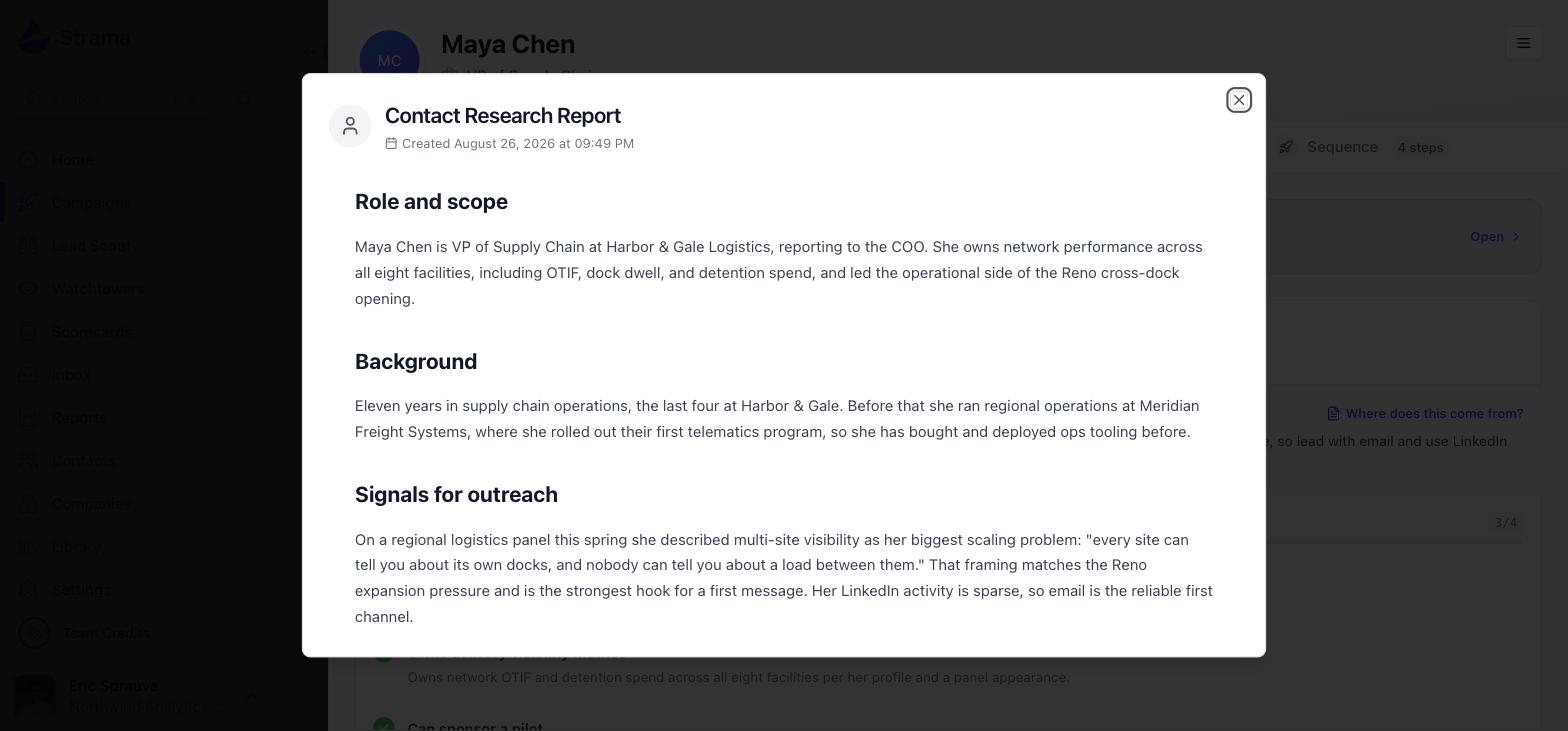
The header shows when the report was created, so you always know how fresh the research is. Company research also appears on the company's page under its Research tab.
Tracing a claim to its source
Every report ends with a numbered Sources list. Where the report body makes a specific claim, small numbered markers link the claim to the source it came from; clicking a marker jumps you to that entry in the list.
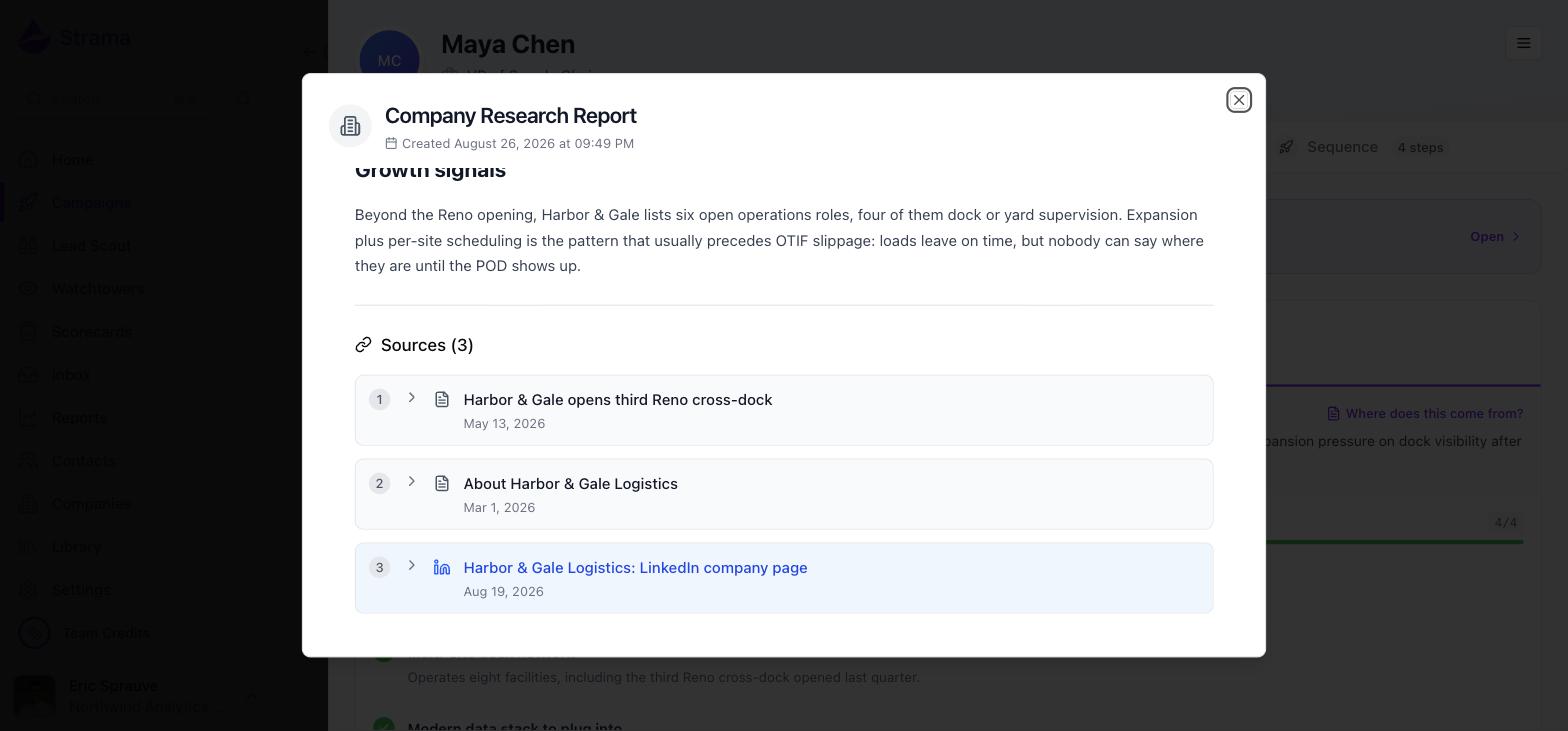
Sources come in two forms:
- Web sources link out to the page, with the publication date when one was found.
- LinkedIn sources (shown in blue) expand in place to show the snapshot of the profile or company page that Strama captured when it did the research.
Below the sources, an expandable Search Queries section lists the exact web searches Strama ran. Each one is clickable, so you can re-run the same search yourself and see what the open web says today.
The verification pass during generation
Research is the first line of defense; verification is the second. After Strama drafts a sequence and before you ever see it, a factual review pass reads every message and checks each claim against the research report. It runs up to three rounds and looks specifically for:
- Statistics, references, or scenarios that the research does not support
- Wrong company names, incorrect titles, or misattributed quotes
- Temporal slips, like calling something "recent" when the source is more than six months old
When it finds a problem, the message is corrected before it reaches your approval queue. A second, lighter pass then reviews style against your style guide. One important guarantee: steps built from templates you wrote yourself are never rewritten by the verifier. It can flag an issue on your copy, but it will not touch your words.
This layered checking is part of why generating a sequence takes a few minutes per lead rather than a few seconds.
Note: Not every specific claim in a message comes from web research. Proof points and statistics can also come from your own library files, mapped in through the Value Mapping Guide at the top of the Intelligence tab, and from your recorded interactions with the lead. If a number looks unfamiliar, check the Value Mapping Guide before assuming it was invented.
When a cited source has disappeared
Web pages move and expire. Job postings are the classic case: they are strong outreach signals precisely because they are temporary, and by the time you check, the posting may already be filled and taken down.
The report is built to survive this. Every citation carries the title and date captured at research time, so you can see what the source said and when it said it, and LinkedIn and website snapshots remain readable inside the report even if the live page changes. If you want to check what is out there now, re-run the search queries listed at the bottom of the report.
If the research itself feels stale, use Re-run on the fit card in the Intelligence tab. Re-grading produces a fresh report from current sources; standard grading rates apply.
FAQ
Is the research hallucinated?
The research model is instructed to report only what it can find and to write "Information not found" otherwise, and every report carries its sources so you can check any claim yourself. The verification pass then re-checks the drafted messages against the report before you see them. No automated system is perfect, which is why the citations are always one click away; if something looks wrong, open the report and trace it.
Where did a specific statistic in my email come from?
Open the lead's Intelligence tab and read the research report; if the statistic is there, its numbered marker points to the source. If it is not in the research, check the Value Mapping Guide, because proof points are often pulled from your own library collateral. If you cannot find it in either place, give feedback on the draft and regenerate.
How does Strama avoid using outdated information?
Research runs against the current date with explicit recency rules: nothing is called "new" or "recent" unless it is under six months old, findings carry their dates, and anything over a year old is flagged. The verification pass applies the same rules to the drafted messages. And because each report is timestamped, you can always see how fresh the research behind a sequence is.
How do I refresh research that has gone stale?
Use Re-run on the fit card in the lead's Intelligence tab. A new grading run does its research from scratch and produces a new report with new sources; the old report is replaced for that lead's grade and future generation.